A friend of mine opened a small bakery a couple years back and asked me to help set up her website. We were both convinced we knew exactly what people would search for — things like “artisan sourdough bakery” and “handcrafted pastry shop.”
Six months later, her site had almost no organic traffic. Zero. I finally pulled up Google Search Console to see what was actually going on, and it turned out real people were searching things like “bakery near me” and “birthday cake shop [her town name].” Nobody was typing “artisan” or “handcrafted” into Google. That was just how we talked about the bakery, not how customers looked for one.
That one mix-up taught me more about keyword research than any course or guide ever did. So here’s what I’ve picked up since then, doing this for small businesses that don’t have a marketing department or a big budget — just real, practical stuff you can actually use.
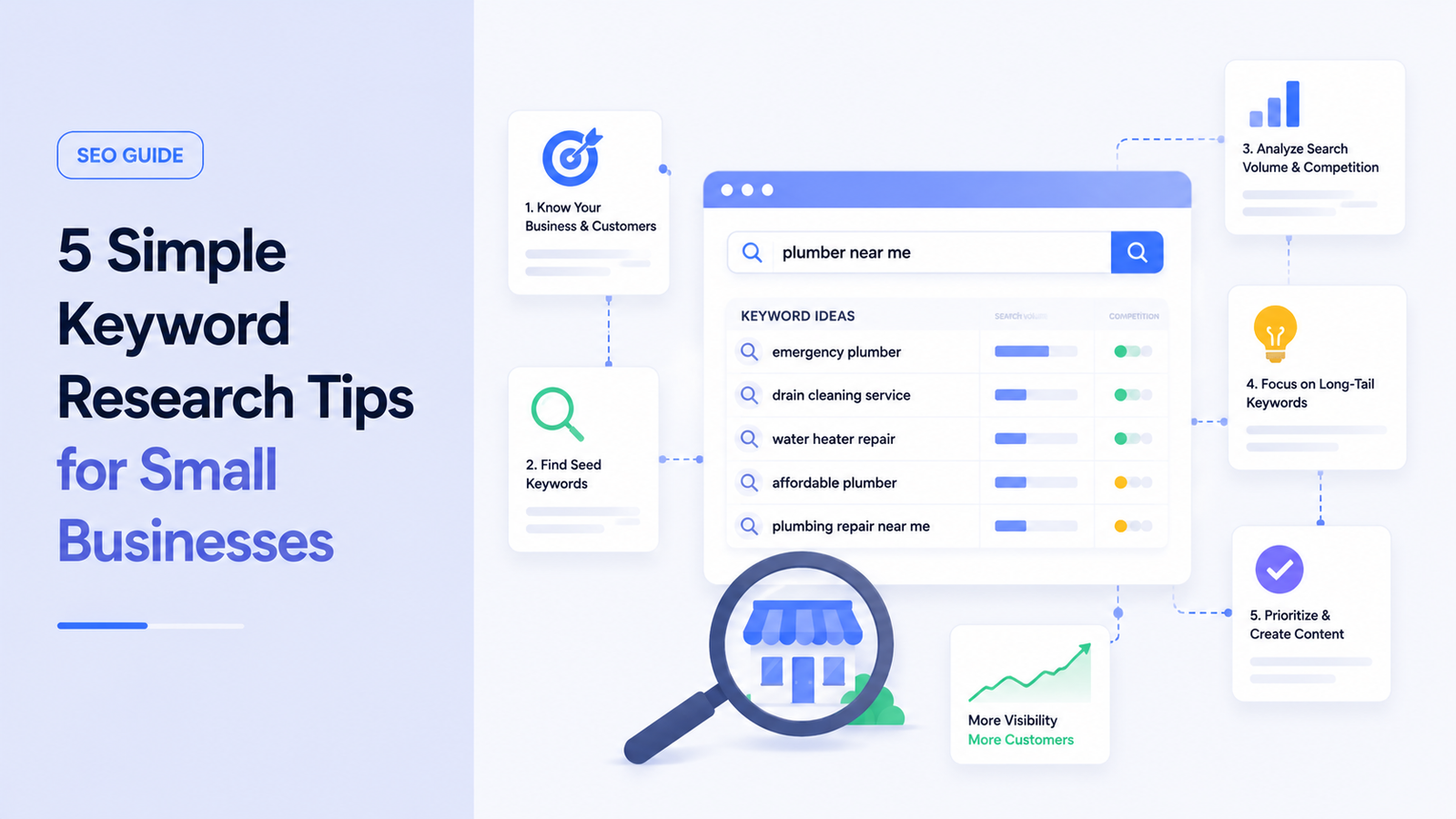
Tip 1: Write Down How Customers Actually Talk (Not How Your Business Talks)
This sounds obvious once you hear it, but almost every small business owner I’ve worked with makes this mistake at least once.
Businesses tend to describe themselves using industry language, brand voice, or slightly fancier wording than regular people use. Customers don’t search that way. They search in plain, sometimes clumsy, very direct language.
How to Actually Find These Words
- Open an incognito browser window and start typing your service into Google. Don’t hit enter — just watch what Google’s autocomplete suggests. Those suggestions are based on real searches.
- Scroll down to the “People also ask” box on the results page. This shows you actual questions people are typing in around that topic.
- Ask a few real customers how they’d search for your business if they didn’t already know it existed. This one sounds informal, but it’s genuinely one of the most useful steps. I’ve had business owners get surprised answers doing this — turns out customers describe their own service completely differently than they do.
For the bakery, this meant swapping “artisan” and “handcrafted” for plain terms like “custom cakes,” “fresh bread daily,” and the actual town name. Traffic didn’t explode overnight, but it started showing up in Search Console within a few weeks, which was more than we’d seen in the previous six months combined.
Tip 2: Use Free Tools Before You Ever Consider Paying for One
You don’t need a $100+/month tool to start doing keyword research. Honestly, most small businesses I’ve worked with never need to go past the free tools, at least early on.
Google Keyword Planner
This one confuses people because it’s built inside Google Ads and seems like it’s only for advertisers. You can still use it without running any ads — just create a free Google Ads account, skip the campaign setup, and go straight to Tools > Google Keyword Planner.
Google Search Console
Type in a broad term related to your business (like “dog grooming” or “custom cakes”), and it’ll spit out a list of related terms along with rough search volume ranges. The volume numbers get more precise once you’re actively spending on ads, but even the free version gives you a solid directional sense of what people are searching.
If your site already exists, this is honestly the most underused tool small business owners have access to. Go to Performance > Search Results, and you can see the exact queries people are already typing in to find your site — including ones you’re barely ranking for on page 2 or 3.
This is exactly how I caught the “artisan” mistake with the bakery site. Google Search Console showed us real search terms bringing in a handful of clicks, which told us what direction to actually lean into.
Ubersuggest
Ubersuggest gives you a simple way to plug in a keyword and see search volume, a rough difficulty score, and related keyword ideas, all without a subscription (there’s a daily limit on the free plan, but it’s usually enough for a small business doing occasional research).
AnswerThePublic
AnswerThePublic is great for content ideas specifically. Type in a topic, and it visually maps out questions people ask around it — things like “why,” “how,” “can,” and “what” variations. It’s a fast way to find blog topic ideas without guessing.
Tip 3: Go After Smaller, More Specific Phrases Instead of Big Broad Ones
Early on, I made the mistake of chasing big, broad keywords because the search volume numbers looked exciting. “Coffee shop” has a massive number of monthly searches. So does “hair salon.” So does basically every generic term in every industry.
The problem is that ranking for those terms usually means competing directly with national chains, huge directories, and sites with years of authority behind them. A small local business realistically isn’t going to outrank Starbucks for “coffee shop.”
What Worked Better
Longer, more specific phrases — usually called long-tail keywords — tend to have less competition and, honestly, better intent behind them. Someone searching “coffee shop with outdoor seating in [town]” is a lot closer to actually showing up than someone searching just “coffee shop.”
A few examples of narrowing things down:
- Instead of “wedding photographer” → “affordable wedding photographer in [city]”
- Instead of “personal trainer” → “personal trainer for beginners near [neighborhood]”
- Instead of “plumber” → “emergency plumber open weekends [city]”
These get far fewer searches individually, but they’re realistic to actually rank for, and the people searching them tend to be closer to making a decision.
Tip 4: Check What’s Actually Ranking Before You Write Anything
This is the tip that would’ve saved me weeks of wasted effort if I’d known it earlier.
I once wrote a blog post targeting the keyword “best time to water plants,” thinking it’d be a good fit for a client’s small gardening supply store. I spent real time on it — decent length, well-researched, nicely formatted. It never ranked past page 4.
When I finally looked at what was actually showing up on page one for that search, it was almost entirely quick-answer snippets and big gardening publication sites, not small business blog posts at all. The intent behind that search was “give me a quick fact,” not “read a full article from a local shop.”
How to Check This Before Writing
- Search the exact keyword you’re targeting yourself, in an incognito window.
- Look at what’s actually ranking — are they blog posts, product pages, local map listings, or big media sites?
- Match your content type to what’s already succeeding there. If it’s mostly map pack listings and local business profiles, that keyword is better served by strengthening your Google Business Profile than writing a blog post.
- If it’s dominated by huge, well-established publications, that keyword might not be realistic for a small blog to compete on yet — better to find a narrower angle.
This single check saves so much wasted writing time. It’s a five-minute step that a lot of people (including me, back then) skip entirely.
Tip 5: Keep Checking Back — Don’t Treat This as a One-Time Task
I used to think keyword research was something you did once at the start of building a website, then moved on from. That’s not really how it works.
Search behavior shifts. Seasons change what people search for. New competitors show up. And once your site starts ranking for a few things, Search Console starts showing you new opportunities you didn’t know existed.
A Simple Routine That’s Worked for Me
- Once a month, check Search Console’s Performance report for queries you’re ranking on page 2 (positions 11-20). Those are often the easiest wins — a small content tweak can push them onto page 1.
- Every few months, revisit your top keyword list and see if search volume or competition has shifted using Keyword Planner or Ubersuggest.
- Keep a simple spreadsheet of keywords you’re targeting, their current position, and notes on what you’ve tried. It doesn’t need to be fancy — a basic Google Sheet works fine.
For the bakery, this ongoing check is actually how we found that people were searching for “gluten free birthday cake [town]” — a phrase we hadn’t targeted at all initially, but Search Console showed it was already bringing in a few clicks. We built one focused page around it, and it became one of the site’s steadiest traffic sources.
A Couple of Honest Mistakes Worth Mentioning
- I once picked keywords based purely on what sounded impressive to the business owner, rather than what data showed people were actually searching. Ego-driven keyword choices rarely perform well.
- I also went too narrow once, picking a keyword phrase so specific that it had almost zero search volume at all. There’s a balance between “realistic to rank for” and “nobody is actually searching this.”
Neither mistake ruined anything permanently, but they both wasted time that could’ve gone toward keywords that actually had a shot.
Where to Start If You’re Doing This for the First Time
If you’re a small business owner reading this and feeling a little overwhelmed, here’s the realistic starting point:
- Open Google Search Console (or set it up if you haven’t already — it’s free and takes about ten minutes).
- Spend twenty minutes looking at what people are already searching to find you.
- Pick two or three long-tail phrases that match your actual services and location.
- Check what’s ranking for those phrases before creating anything new.
- Set a monthly reminder to check back in.
None of this requires an agency, a big budget, or technical skills. It just requires actually looking at what real people are typing, instead of guessing based on how your business talks about itself. That one shift alone is what turned things around for the bakery, and it’s the same starting point I’d suggest to anyone doing this for the first time.