Last winter I was staring at my analytics dashboard, completely confused. One of my blog posts was ranking #4 on Google, but it was getting more clicks than posts I had sitting at #1 and #2. Made no sense until I actually opened the search results page myself and looked.
There it was. My paragraph, sitting inside a little box at the very top of the page, above every single ranked result. That’s the featured snippet. And that day I basically fell down a rabbit hole trying to figure out how it worked, because clearly it was doing more for my traffic than “ranking #1” ever did.
If you’ve ever typed a question into Google and seen that box with a short answer pulled straight from someone’s website — that’s what we’re talking about. And yes, you can actually get your own content to show up there. I’ve done it, lost it, gotten it back, and learned some genuinely annoying lessons along the way.
What a Featured Snippet Actually Is (In Plain Words)
Forget the technical definition for a second. Think of it like this: when you ask a friend a quick question, they don’t give you a whole essay. They give you two or three sentences that answer it directly, then maybe elaborate if you ask more.
Google is trying to do the same thing. When someone searches “what is a VPN” or “how long does coffee stay fresh,” Google doesn’t want to make them click through and scroll. It wants to grab the most useful chunk of text from a page and show it right there.
That chunk usually comes in one of a few formats:
- A paragraph snippet (this is what we’re focusing on today)
- A numbered list
- A bullet list
- A table
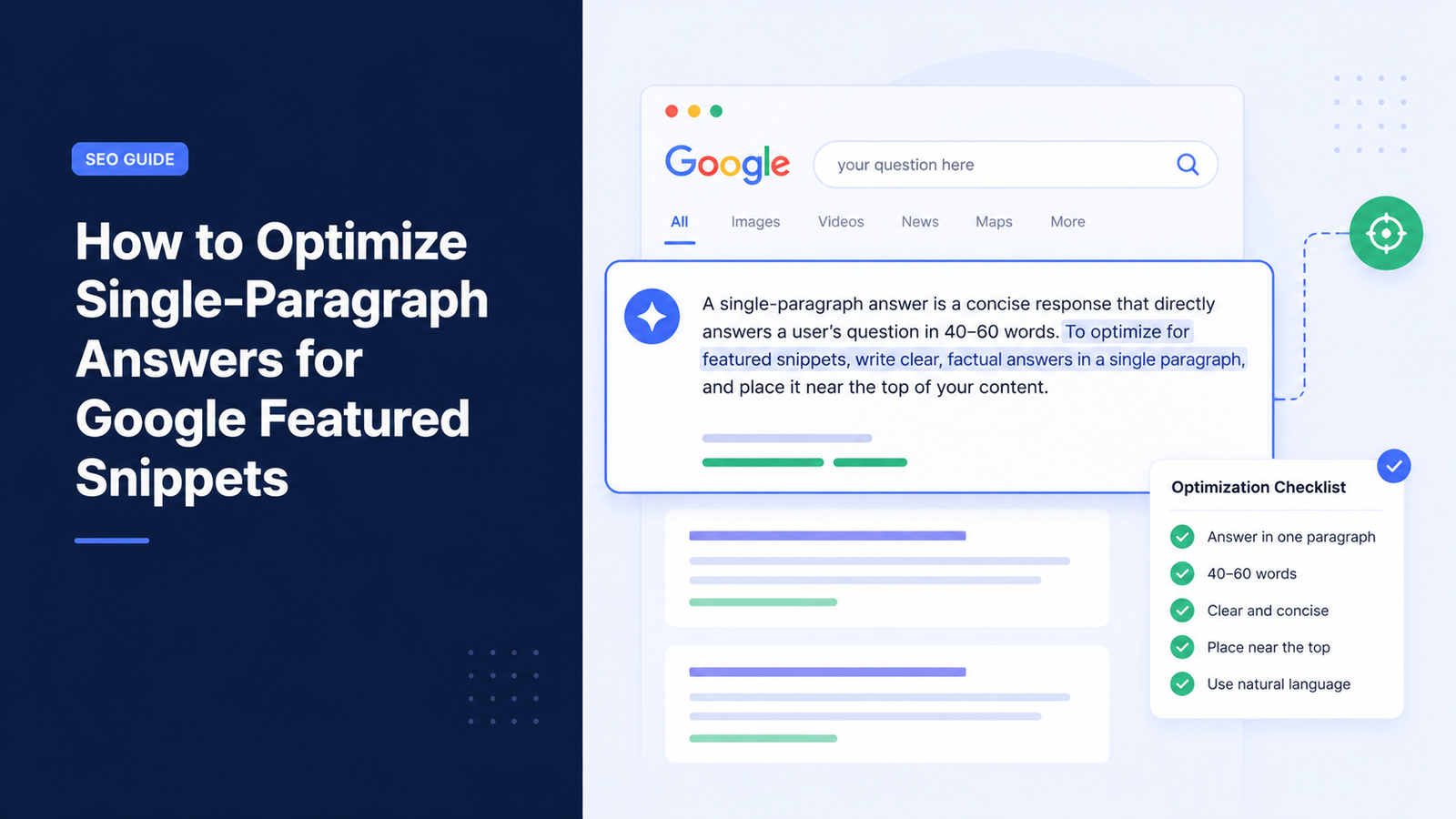
Paragraph snippets are the most common one, especially for “what is,” “why does,” and “how does X work” type questions. And honestly, they’re also the easiest to try and win, because you don’t need fancy formatting — just a well-written, tightly answered paragraph.
Why I Started Caring About This At All
I run a small tech tips site as a side project. Nothing huge, maybe 15,000 visits a month. For the longest time I wrote articles the “normal” way — long intros, some storytelling, then eventually the answer buried somewhere in paragraph four or five.
Then I noticed a competitor’s site, way less detailed than mine, kept stealing the featured snippet for a keyword I cared about. Their article was honestly worse than mine in terms of depth. But they were winning that box, and I wasn’t.
So I copied their format (not the words, just the structure) on one of my own pages. Within about three weeks, I had the snippet. Traffic on that specific page jumped close to 40% without me changing the ranking position at all. That’s when it clicked for me — sometimes formatting beats depth.
Step-by-Step: How I Actually Optimize a Paragraph for the Snippet
I’m going to walk you through the exact process I use now on every article where I’m targeting a question-based keyword.
Step 1: Find the Actual Question People Are Typing
Before writing anything, I check what questions are tied to the keyword. My go-to tools for this are:
- Google’s “People Also Ask” box — just search your topic and scroll down
- AnswerThePublic — good for seeing question variations
- Ahrefs or Ubersuggest — shows question keywords with search volume
I usually pick the exact phrasing people use. If people search “how long does almond milk last,” I don’t rewrite it as “shelf life of almond milk” in my heading. I match their words closely.
Step 2: Put the Answer in the First 1-2 Sentences
This is the part most people mess up, myself included when I started. We’re trained to build up to an answer — some context, a little story, then the point.
Google’s snippet algorithm doesn’t care about your buildup. It wants the answer fast.
So now, right under my H2 or H3 that matches the question, I write the direct answer immediately. Something like:
“Almond milk typically lasts 7-10 days after opening if refrigerated properly, though unopened cartons can last several months past the printed date.”
Then I follow that with supporting detail in the same paragraph or the next one.
Step 3: Keep It Between 40-60 Words
I learned this one the hard way. My early attempts at snippet-optimized paragraphs were either way too short (like one sentence, which felt incomplete) or way too long (like 150 words, which Google just truncates awkwardly).
Google tends to pull paragraphs in the 40-60 word range most often. Not a hard rule, but it’s the sweet spot I’ve had the most luck with. I actually keep a Google Doc where I paste my paragraph and use the word count tool to check before publishing.
Step 4: Use the Question as Your Heading
This sounds obvious but I skipped it for months. If someone searches “why does my phone battery drain fast,” your H2 or H3 should literally say that, or something extremely close to it.
Google matches the heading to the query, then looks at the paragraph right below it as the likely answer. If your heading is vague — like “Battery Drain Explained” — you’re making Google work harder to connect the dots, and it often just won’t bother.
Step 5: Avoid Fluff Words in That First Sentence
Words like “well,” “so,” “basically,” “in this article we will discuss” — cut all of that from your answer paragraph specifically. I still use conversational language everywhere else in my writing (like right now), but that one specific paragraph needs to be lean.
Compare these two:
- ❌ “So, when it comes to phone batteries, there are actually quite a few reasons why they might drain faster than expected, and we’ll get into that here.”
- ✅ “Phone batteries drain fast mainly due to background apps, screen brightness, and weak signal strength forcing the phone to work harder to connect.”
The second one is the one that gets pulled into the box.
A Mistake That Cost Me a Snippet I Already Had
Here’s something I don’t see mentioned much. I actually won a featured snippet for “how to reset a router” and held it for almost four months. Then I lost it overnight.
What happened? I went back and “improved” the article for SEO reasons — added more keywords, expanded the intro, and moved my direct answer paragraph down because I thought a longer intro would help with dwell time.
Big mistake. The moment I buried the answer, Google dropped the snippet and gave it to a competitor within about two weeks. I only noticed because I happened to check my analytics and saw a sudden drop in impressions for that page.
Lesson learned: once you win a snippet, don’t mess with the structure that got you there. If you want to add more content, add it below the answer paragraph, not around it.
Tools I Actually Use to Track and Test This
I’m not going to list fifty tools you’ll never open. Just what I actually use:
- Google Search Console — to see which queries are triggering impressions but low clicks (a sign a competitor has the snippet)
- Ahrefs’ “SERP features” filter — shows you which keywords already have a paragraph snippet, so you know what to target
- Incognito Google searches — sounds basic, but I manually search my target keywords in an incognito window every couple weeks just to see who’s holding the snippet and how they’ve formatted their answer
Search Console is honestly the most underrated one here. If a page has thousands of impressions but a low click-through rate, and it’s ranking in the top 5, there’s a decent chance someone else has the snippet for that query and is eating your clicks.
Formatting Details That Actually Matter
A few small things I’ve noticed make a real difference:
Use clear H2/H3 hierarchy. Don’t skip from H1 straight to H4. Google’s crawler seems to read structure more easily when it’s logical.
Don’t hide your answer paragraph inside a div with weird styling. I once had a client’s WordPress theme wrap the intro paragraph in a colored box with custom CSS. Google straight up ignored it for months. The moment I unwrapped it into a plain paragraph tag, it started showing up in test tools within days.
One question, one paragraph. If your paragraph tries to answer three related questions at once, Google usually just skips it and looks elsewhere on your page or on someone else’s.
Keep sentences short inside that paragraph. Long, comma-heavy sentences make it harder for the algorithm to isolate a clean chunk. Short, direct sentences extract cleaner.
What Doesn’t Seem to Matter (Contrary to What People Claim)
I’ve read a lot of “SEO expert” advice that turned out to be wrong in my own testing:
- Domain authority isn’t everything. My small site has beaten sites with way higher authority scores just because my paragraph was better structured for extraction.
- Snippets don’t require the #1 ranking. Most SEO folks know this by now, but plenty of beginners assume you need to be #1. I’ve pulled snippets from position #4 and #5 multiple times.
- Bold text inside the paragraph doesn’t seem to help. I tested this on a few pages, bolding the “answer” sentence. No noticeable difference in whether it got picked up.
A Simple Way to Practice This
If you want to try this on an existing article without rewriting the whole thing, here’s what I’d actually do:
- Pick one question your article already partly answers
- Add an H2 or H3 using that exact question as the heading
- Write a fresh 40-60 word answer directly under it, answer-first
- Leave your existing content below it untouched
- Wait 2-3 weeks, then check Search Console for that query
This is basically a low-risk test. You’re not rewriting your whole page, just adding a snippet-friendly section to something that already ranks reasonably well.
Where This Actually Gets You
I won’t pretend featured snippets are some magic traffic switch. Some queries barely get extra clicks even with a snippet because people ask follow-up questions in the same search session and never click at all. That’s a real thing Google calls “zero-click searches,” and yes, it’s slightly annoying if you’re chasing traffic.
But for a lot of “how” and “why” and “what is” queries, especially ones with decent search volume, that box at the top genuinely pulls in clicks that a #3 or #4 ranking never would have gotten otherwise.
The real shift for me wasn’t learning some secret trick. It was just accepting that my writing habits — building up to a point slowly, adding personality before substance — work great for readers who are already on my page, but work against me for the specific paragraph Google is scanning to answer a question.
So now I just write two versions of myself into every article. The direct, no-fluff answer-giver for that one key paragraph, and the regular conversational writer for everything else. Once I stopped fighting that split, snippets stopped feeling random and started feeling like something I could actually go after on purpose.